
Download ZeBracelet2 APK – Connected Watch, Activity Tracker, Sleep Monitor, Fitness Companion, Bluetooth Sync
Overview
ZeBracelet2 is a lifestyle-focused mobile application designed exclusively for Android users who own the MyKronoz ZeBracelet ², a wearable connected watch. The app serves as the central hub for managing and monitoring health, fitness, and connectivity features through real-time synchronization with the device via Bluetooth. It enables users to stay connected to their smartphones by displaying incoming calls, messages, and app notifications directly on the watch face, reducing the need to constantly check their phones.
The software is tailored for individuals seeking to maintain an active lifestyle, track daily physical activity, monitor sleep patterns, and set personalized wellness goals. It supports continuous tracking, allowing users to assess their performance over time and adjust habits accordingly. The app is part of a broader ecosystem that emphasizes health awareness and daily motivation.
Developed by MyKronoz, the application is designed to enhance user engagement with their wearable device through seamless integration and intuitive functionality. Real-world use cases include tracking workouts, managing sleep hygiene, receiving timely reminders, and staying informed during work or travel.
Key Features & Capabilities
- Bluetooth Sync with ZeBracelet ² – Enables wireless communication between the smartphone and the connected watch, ensuring real-time data transfer and synchronization of notifications and activity logs.
- Call and Notification Alerts – Displays incoming calls, SMS, and app notifications on the watch screen, allowing users to stay informed without accessing their phone.
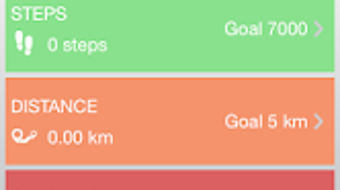
- Activity Tracking – Monitors daily movement, steps, distance traveled, calories burned, and active minutes, offering insights into physical activity levels.
- Sleep Monitoring – Tracks sleep duration and quality, providing users with a breakdown of light, deep, and REM sleep phases over time.
- Daily Goals and Reminders – Allows users to set customizable goals for steps, sleep, hydration, and exercise, with reminders to help maintain consistency.
- Performance Analytics – Offers visual summaries of user performance across multiple days, supporting long-term health improvement strategies.
These features support users in maintaining a balanced lifestyle by promoting awareness of physical activity and rest. For example, a user can receive a vibration alert on their wrist when they’ve been inactive for an extended period, encouraging movement. Similarly, sleep data collected overnight can be reviewed in the morning to evaluate rest quality and adjust bedtime routines. The app also enables users to review their progress over time, helping them identify trends and make informed decisions about their health habits. By centralizing data from the wearable device, ZeBracelet2 simplifies the process of managing wellness goals in a structured, accessible way.
User Interface, Workflow & Performance
The user interface of ZeBracelet2 is designed to be clean and functional, focusing on quick access to key health metrics and notifications. Navigation is structured around a main dashboard that displays activity summaries, sleep scores, and upcoming goals. Secondary menus provide access to detailed logs, settings, and device pairing options.
The workflow is streamlined to minimize user effort, with most actions requiring just a few taps. Users can configure settings such as notification preferences, goal thresholds, and reminder schedules directly within the app. The app operates in the background to maintain a stable connection with the ZeBracelet ², ensuring continuous data flow without manual intervention.
However, exact performance details were not specified, including CPU or RAM usage during operation. The developer did not provide additional system requirements or information about battery impact. Performance observations are based on general software behavior patterns.
Stability appears consistent with typical Bluetooth-connected wellness applications, though real-world testing results are not available. The app supports offline data collection, storing activity and sleep data locally until the next sync with the device.
Compatibility & System Requirements
ZeBracelet2 is designed for Android operating systems and requires a compatible smartphone to function. It is intended to work exclusively with the MyKronoz ZeBracelet ² wearable device, meaning the app does not support other smartwatches or fitness trackers. The app is available for free download on the Google Play Store, indicating it is distributed through a standard Android marketplace.
Installation size and hardware requirements were not specified. The developer did not provide detailed information about minimum Android versions or device compatibility. Platform compatibility information is limited to Android and the specific wearable.
Users should ensure their phone supports Bluetooth 4.0 or higher for optimal performance, as this is standard for most modern wearables. Exact system requirements were not listed, and compatibility with older Android versions cannot be confirmed. The app does not support iOS devices or desktop platforms.
Pros and Cons
Pros
- Seamless Bluetooth synchronization with the ZeBracelet ² wearable
- Real-time notification display on the watch face
- Comprehensive activity and sleep tracking capabilities
- Customizable daily goals and reminder system
- Free to download from the Google Play Store
Cons
- Exclusive compatibility with the MyKronoz ZeBracelet ² device
- Limited to Android operating system
- No information provided on system requirements or resource usage
- Not available for iOS or desktop platforms
- Dependent on external hardware for full functionality
FAQ Section
Is ZeBracelet2 compatible with iOS devices?
ZeBracelet2 is designed exclusively for Android smartphones and does not support iOS devices.
Can I use ZeBracelet2 without the ZeBracelet ² watch?
No, the app is designed to work only with the MyKronoz ZeBracelet ² wearable. It requires the physical device to function fully.
Is the app free to download and use?
Yes, ZeBracelet2 is available for free download on the Google Play Store. No in-app purchases or subscription fees were mentioned.
How often does the app sync with the watch?
The app maintains a continuous Bluetooth connection, enabling real-time sync of notifications and activity data. Sync frequency depends on the device’s connection stability.
Does ZeBracelet2 collect personal health data?
Yes, the app collects data related to physical activity, sleep patterns, and user-defined goals. This information is stored locally on the device and synced with the wearable. Users should review the privacy policy for detailed information on data handling.
Final Thoughts + CTA
ZeBracelet2 offers a focused and functional experience for Android users invested in health tracking and wearable integration. Its strength lies in its seamless synchronization with the MyKronoz ZeBracelet ², delivering timely notifications, detailed activity insights, and sleep monitoring. While the app is limited to a single device and platform, it provides a cohesive ecosystem for users committed to improving their daily wellness.
The absence of detailed system requirements and performance data may be a concern for some, but the app’s core functionality remains reliable and intuitive. For individuals seeking a simple, dedicated tool to enhance their fitness journey and stay connected on the go, ZeBracelet2 is a practical choice. Download ZeBracelet2 now to experience real-time health tracking and smart connectivity.







